> For the complete documentation index, see [llms.txt](https://docs.nusa.io/llms.txt). Markdown versions of documentation pages are available by appending `.md` to page URLs; this page is available as [Markdown](https://docs.nusa.io/nusa-v2/earn-1/staking-idrx.md).

# Staking IDRX

Stake your IDRX to earn IDRX rewards

Staking IDRX allows you to earn IDRX rewards at a competitive rate. You can follow the guide below to stake IDRX:

{% hint style="info" %}
If you don't have IDRX, you can mint iDRX in [idrx.co](https://idrx.co/) or by swapping from another token on [Nusa Swap](https://stage-v2.nusa.finance/swap)
{% endhint %}

[<mark style="color:red;">-— VIDEO ---</mark>](#user-content-fn-1)[^1]

## **Step-by-step Guide:**

1. Visit the [Nusa Official Website](https://home.nusa.io/) and click **Launch App**

   <figure><img src="https://761131866-files.gitbook.io/~/files/v0/b/gitbook-x-prod.appspot.com/o/spaces%2FCsQrs8GTxejVrINYNH9J%2Fuploads%2FLe97W8QBNrSfZsiiFXAk%2Fimage.png?alt=media&amp;token=b8d617aa-709c-42d9-915a-c49e95862d59" alt=""><figcaption></figcaption></figure>
2. Click the **Connect** button to connect your wallet

   <figure><img src="https://761131866-files.gitbook.io/~/files/v0/b/gitbook-x-prod.appspot.com/o/spaces%2FCsQrs8GTxejVrINYNH9J%2Fuploads%2FpfZPmuxubOU4j17snwSC%2Fimage.png?alt=media&amp;token=8d3186b8-5635-4cae-a126-ca6c4bfdcd68" alt=""><figcaption></figcaption></figure>
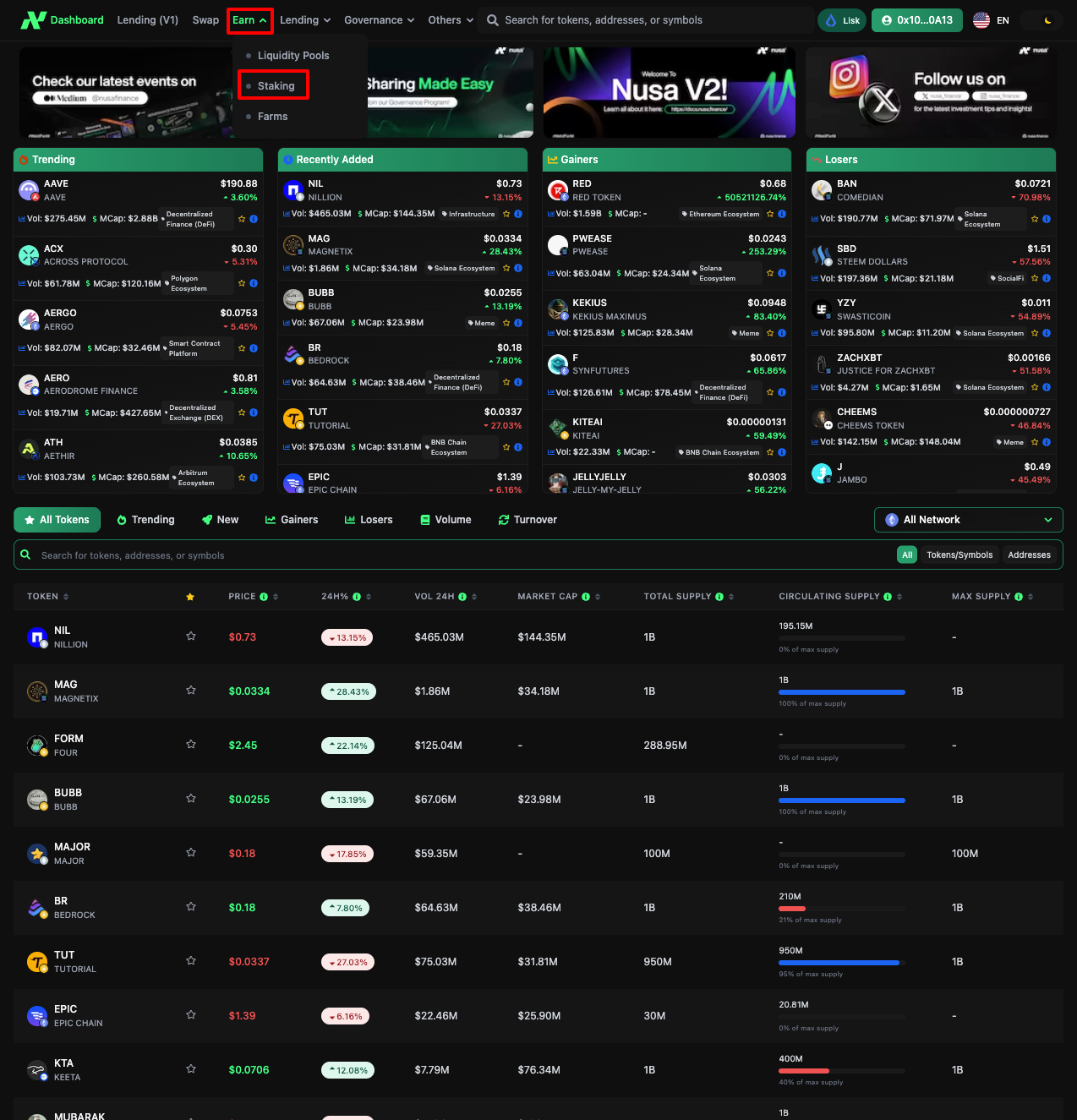
3. Hover the **Earn** menu and click **Staking**

   <figure><img src="https://761131866-files.gitbook.io/~/files/v0/b/gitbook-x-prod.appspot.com/o/spaces%2FCsQrs8GTxejVrINYNH9J%2Fuploads%2Fz0DaHIwpgzxPTI2P2B6C%2Fimage.png?alt=media&amp;token=41ba6285-a476-439d-b4fe-14b88c096a1c" alt=""><figcaption></figcaption></figure>
4. Choose the network where you like to stake and click the **Stake** button

   <figure><img src="https://761131866-files.gitbook.io/~/files/v0/b/gitbook-x-prod.appspot.com/o/spaces%2FCsQrs8GTxejVrINYNH9J%2Fuploads%2F6S86aWrTUNTFZ2UUK2iX%2Fimage.png?alt=media&amp;token=c740e9dd-5c89-4a93-804f-461ce871ad5b" alt=""><figcaption></figcaption></figure>
5. Pick the duration and input the amount. <br>

   <figure><img src="https://761131866-files.gitbook.io/~/files/v0/b/gitbook-x-prod.appspot.com/o/spaces%2FCsQrs8GTxejVrINYNH9J%2Fuploads%2FkwERB0aCBpHTDTwaQe4T%2Fimage.png?alt=media&amp;token=1d6fdd5e-f118-4f5b-acef-ced6b4ad05a9" alt=""><figcaption></figcaption></figure>
6. If this is your first time staking IDRX, you must approve Nusa's smart contract by clicking the **Approve IDRX** button.

   <figure><img src="https://761131866-files.gitbook.io/~/files/v0/b/gitbook-x-prod.appspot.com/o/spaces%2FCsQrs8GTxejVrINYNH9J%2Fuploads%2FfLrgNoVEPTpXfBPjm5mc%2Fimage.png?alt=media&amp;token=5e8c6c78-e29f-4d28-acd6-dcf4b7ad7554" alt=""><figcaption></figcaption></figure>
7. After that click the **Stake** button and sign the transaction in your wallet.<br>
8. Wait for a minute until the transaction is successful. You can claim your rewards by clicking the **Claim** button and unstake your IDRX early by clicking the **Unbound** button (for Flexible type only)<br>

[^1]: